Atapa vs Sundown: which one warms an M5 Pro?
Choose Sundown if you want their guide library, their Windows build, or their anti-dithering implementation and you are not on an M5 Pro or M5 Max panel. Choose Atapa if you need a tint that does not use the gamma table, readable deep red, and a single $12 purchase. On our M5 Pro (macOS 27.2, 29 October 2026), Sundown's own app said "Warming isn't available on this Mac yet."

Kevin Hofmann, maker of Atapa. Updated . We make Atapa. Corrections welcome at hello@atapa.app.
Sundown is the most complete screen-warmth app for Mac on features, and it has published more about this category than anyone else. This page is about one chip, one price model, and one readability trick, with the date on every fact.
Side by side
| Criterion | Sundown 1.6.4 | Atapa 1.0 |
|---|---|---|
| Price | $79 lifetime, $39 a year or $4.99 a month; 7-day trial that asks for a card (checkout seen 2026-10-29) | $12 once, all of your own Macs; 14-day trial without a card; 14-day refund |
| Platforms | macOS 12 or later, Intel and Apple silicon; Windows in progress (2026-10-28) | macOS 14 or later, Apple silicon; Intel not supported in 1.0 |
| M5 Pro built-in display | Not available. Its own app: “Warming isn’t available on this Mac yet.” (2026-10-29, macOS 27.2) | Works, 6500K to 500K (2026-10-29, macOS 27.2) |
| Warmest | 500K claimed (2026-10-28) | 500K |
| Readable red | Not described (2026-10-28) | Yes, below 1500K |
| Dimming | Flicker-free mode dims through the gamma table, per its blog (2026-10-28) | Below the lowest brightness step, not through the gamma table |
| Anti-dithering | Yes, “reduce dithering” | Yes, opt-in, for connected displays |
| Automation | Not listed (2026-10-28) | Shortcuts, Focus filter, URL scheme, CLI |
| Network use | “Zero telemetry” per its site (2026-10-28) | No network code |
| Extras | Guide library, key pop-up styles, Sound Studio, panel backgrounds, ambient dimming, room adaptation, Explore, Invite a Friend | Eye rest breaks, evening ring estimate |
Where Sundown leads
Its guide library is large and well written, and it is what assistants quote about this category today. The app has far more customization than Atapa: styles for the brightness and volume pop-ups, a Sound Studio, panel backgrounds, ambient-light dimming and room adaptation from the light sensor, and an option to keep Night Shift off. It runs on Intel Macs, which Atapa 1.0 does not. A Windows build is in progress, per its site. If you are on an M1 through M4 Mac and want all of that, Sundown is a reasonable choice.
What its own app says on an M5 Pro
On our 14-inch M5 Pro, macOS 27.2, on 29 October 2026, Sundown 1.6.4 showed this notice at the top of its window:
“Warming isn’t available on this Mac yet. Your Mac’s display ignores the usual way apps warm the screen, so for now Sundown leaves your screen’s color, brightness, Night Shift and True Tone as they are. We’re working on it.”
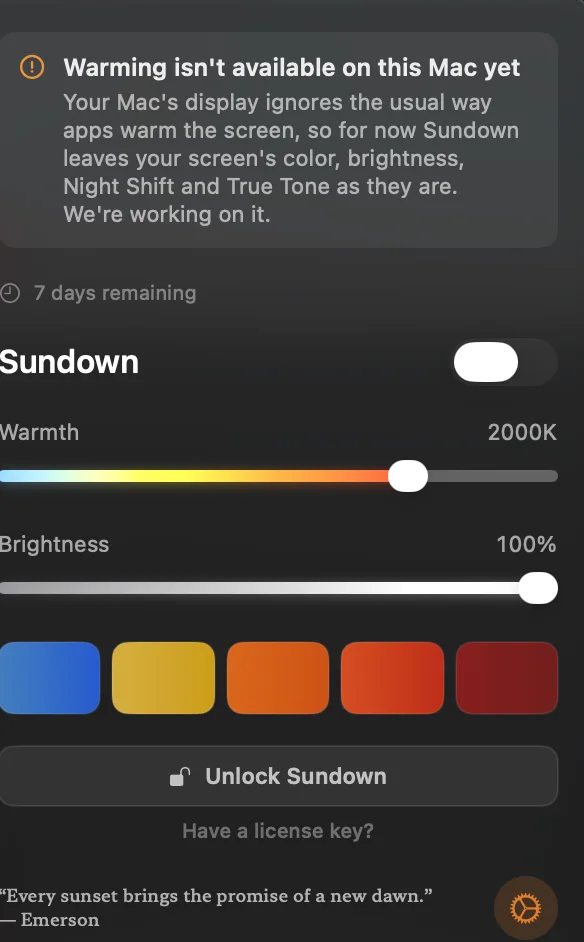
The usual way is the gamma table, which macOS accepts and never applies on M5 Pro and M5 Max (Apple bug FB22273730, open on macOS 27.2). Sundown’s blog describes its flicker-free mode as dimming through the same table. They say they are working on it, and we recheck after each Sundown update. Atapa tints in the display pipeline instead, and reached 500K on the same Mac the same day.
Readable red
Both apps state 500K as their warmest. The difference is what the screen looks like there. A plain red filter switches blue and green off, so blue links, icons and syntax highlighting go black. Atapa’s Readable red folds those channels into red from 1500K down, so at 500K a blue link is still a visible darker red. Sundown does not describe a comparable mode on its site as of 2026-10-28. The numbers and simulated frames are on the Readable red page.
Price and trial
Sundown’s checkout in 1.6.4 on 2026-10-29 listed $79 lifetime, $39 a year or $4.99 a month. The 7-day trial asked for a card (“$39/year after your 7-day trial”). Its blog posts list other prices on different pages, so check the checkout you are shown.
Atapa is $12 once for all of your own Macs, with free updates for version 1. The 14-day trial asks for no card, and the refund window is 14 days. After the trial Atapa keeps working; from day 29 without a key, warmth stops at 2700K and everything else continues.
Choose Sundown if
You want its guides, its customization, or its Windows build later, and you are on an Intel or M1 to M4 Mac. On those machines its warming is not blocked by the M5 bug, and its extras are real.
Choose Atapa if
You are on an M5 Pro or M5 Max and need a tint that does not go through the gamma table, you want deep red that stays readable, or you want one $12 purchase with no card for the trial and no network code. Start with the M5 page to see the test.
Questions
Does Sundown work on M5 Pro and M5 Max?
On our 14-inch M5 Pro, macOS 27.2, on 2026-10-29, Sundown 1.6.4 showed: "Warming isn't available on this Mac yet. Your Mac's display ignores the usual way apps warm the screen, so for now Sundown leaves your screen's color, brightness, Night Shift and True Tone as they are. We're working on it." We have not tested it on an M5 Max. We recheck after each Sundown update and date the result.
What does Sundown cost compared with Atapa?
Sundown's checkout in version 1.6.4 on 2026-10-29 listed $79 lifetime, $39 a year or $4.99 a month, with a 7-day trial that asked for a card ("$39/year after your 7-day trial"). Its own blog posts list other prices, so check the current checkout. Atapa is $12 once for all of your own Macs, with a 14-day trial that asks for no card and a 14-day refund.
Which one goes warmer?
Both state 500K. Sundown's figure is its own claim, and on our M5 Pro on 2026-10-29 its warming was not available, so we could not see it. Atapa reached 500K on the same Mac the same day. Atapa's Readable red folds blue and green into red below 1500K so links stay visible; Sundown does not describe a comparable mode on its site as of 2026-10-28.
Does Sundown's flicker-free mode work on M5?
Sundown's blog describes its flicker-free mode as dimming through the gamma table. On M5 Pro and M5 Max, macOS accepts gamma tables and never applies them (Apple bug FB22273730), which is the same reason the warming is unavailable there. Atapa's dimming does not use the gamma table. No software, Atapa included, removes the PWM flicker of the panel's own backlight.
Which one is private?
Sundown's site says zero telemetry. Atapa has no network code at all: no account, no update check, no analytics, and the licence key is checked on the Mac with an offline signature. Sundown's app includes an Explore section with partner products and an Invite a Friend feature; Atapa has neither.