Atapa Shortcuts actions, Focus filter, URL scheme and CLI: the reference
Atapa for Mac ships 9 Shortcuts actions (Wind Down, Show True Color, Follow My Evening, Set Evening Intensity, Set Warmth, Set Brightness, Apply Preset, Turn Atapa On or Off, Get Atapa State), a Focus filter, the atapa:// URL scheme and a command line, all on the Mac with no network. This matches version 1.0 as of 29 October 2026.

Kevin Hofmann, maker of Atapa. Updated .
Everything on this page runs on the Mac, talks to the running app, and needs no account. Atapa has to be running for any of it to do anything; the actions report “Atapa is not running.” otherwise.
Shortcuts actions
Nine actions appear in the Shortcuts app and in Spotlight once Atapa has launched once.
| Action | Parameters | What it does |
|---|---|---|
| Wind Down | Wind down (on or off; leave empty to switch) | Goes to tonight’s deepest stop right away, or back to your evening |
| Show True Color | Minutes (1 to 1440, default 15) | Removes the warmth for a while, for photos or video; it comes back by itself |
| Follow My Evening | none | Drops wind down, true color and manual changes, and returns to the evening curve |
| Set Evening Intensity | Intensity: Gentle, Warm or Deep red | Sets how warm the night gets: 1900K, 1200K or 500K at the deepest stop |
| Set Warmth | Kelvin (500 to 6500); Brightness % (1 to 100, optional) | Holds the screen at that warmth, and brightness if given |
| Set Brightness | Percent (1 to 100) | Dims below the lowest backlight level; 100 is no dimming |
| Apply Preset | Preset (one of yours, e.g. Midnight) | Holds that preset’s warmth and brightness |
| Turn Atapa On or Off | On (on or off; leave empty to switch) | Turns the warm screen on or off |
| Get Atapa State | none | Returns text: on or off, warmth, brightness, and what Atapa is doing, e.g. “on · 1200K · brightness 80% · Sunset” |
Set Evening Intensity works on the plan the bedtime question creates. If you tuned the curve by hand in Settings, the action reports “Your evening curve was tuned by hand. Change the intensity in Atapa’s Settings.” instead of guessing.
Four actions also answer Siri: “Wind down with Atapa”, “Show true color with Atapa”, “Follow my evening with Atapa”, and “Toggle Atapa” or “Turn Atapa on or off”.
Focus filter
Atapa adds one Focus filter, “Set Atapa’s screen”, with one choice, Screen:
| Screen | While the Focus is on |
|---|---|
| Deep red (wind down) | Tonight’s deepest stop |
| True color | No warmth |
| Follow my evening (left empty) | Nothing changes |
When the Focus ends, whatever the filter changed is undone and your evening comes back. Sleep Focus to deep red is the obvious pairing; Photo editing or Gaming to true color is the other. Set it in System Settings, Focus, the Focus you want, Focus filters, Add filter, Atapa.
URL scheme
Any app that can open a URL can drive Atapa, including Shortcuts, Keyboard Maestro, Raycast, Alfred and a terminal with open.
| URL | Effect |
|---|---|
atapa://set?kelvin=1200&dim=80 | Hold 1200K at 80% brightness; either parameter may be left out |
atapa://preset/Midnight | Apply the preset named Midnight (also atapa://preset?name=Midnight) |
atapa://toggle | Turn Atapa on or off |
atapa://reveal | Toggle true color (the hotkey’s hold behavior, as a switch) |
atapa://winddown | Wind down, or back to the evening if already winding down |
atapa://truecolor?minutes=30 | True color for 30 minutes (default 15, up to 1440) |
atapa://evening | Follow my evening: drop every hold |
dim accepts 0 to 1 or 1 to 100; 80 and 0.8 mean the same. Preset names match without regard to case. From a terminal:
open "atapa://set?kelvin=1200&dim=80"Command line
The app binary forwards a command to the running app and exits, printing “sent to Atapa: …”. The path is /Applications/Atapa.app/Contents/MacOS/Atapa.
| Flag | Effect |
|---|---|
--set-kelvin 1200 | Hold 1200K |
--set-dim 80 | Hold 80% brightness (0 to 1 or 1 to 100) |
--preset Midnight | Apply the preset named Midnight |
--toggle | Turn Atapa on or off |
--reveal | Toggle true color |
--wind-down | Wind down, or back if already winding down |
--true-color 30 | True color for 30 minutes (default 15) |
--follow-evening | Drop every hold and follow the evening curve |
/Applications/Atapa.app/Contents/MacOS/Atapa --preset MidnightKeyboard shortcuts
Recorded in Settings, Shortcuts. These are the defaults in 1.0; click a field to change one, Delete clears it.
| Shortcut | Default | What it does |
|---|---|---|
| Reveal true color | ⌥⌘T, hold | True color while the keys are held; Reveal behavior can be set to toggle |
| Toggle Atapa | ⌃⌥⌘B | On or off |
| Warmer | ⌃⌥⌘→ | One warmth step warmer (250K by default) |
| Cooler | ⌃⌥⌘← | One warmth step cooler |
| Dimmer | ⌃⌥⌘↓ | One dim step darker (5% by default) |
| Brighter | ⌃⌥⌘↑ | One dim step brighter |
| Next preset | ⌃⌥⌘P | Steps through the presets in the order shown in Settings, Presets |
| Emergency reset | ⌃⌥⌘⌫ | Restores true color and drops every hold; cannot be changed |
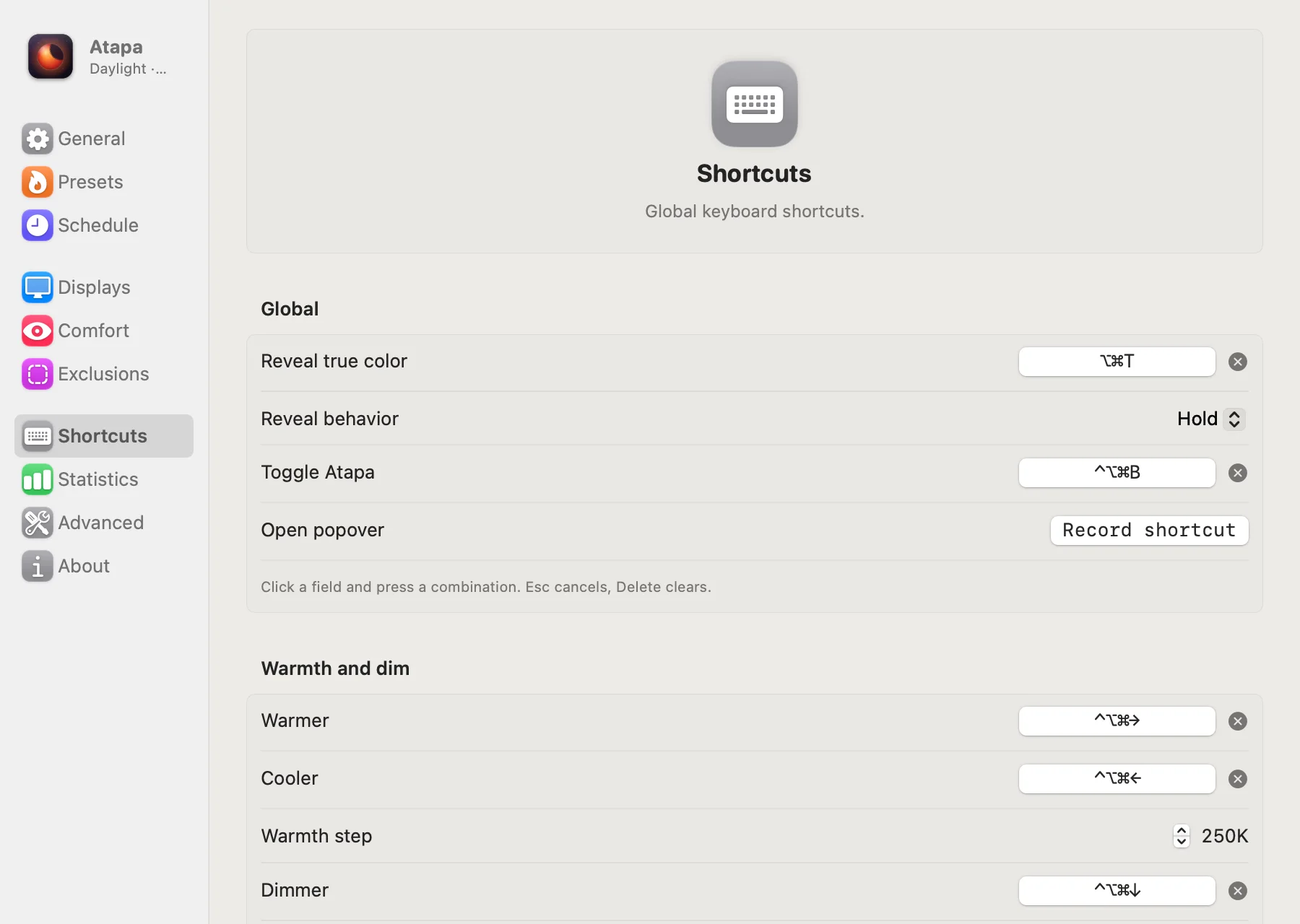
The emergency reset is the escape to remember. If the screen is ever stuck tinted, ⌃⌥⌘⌫ clears it; if Atapa is force-quit or crashes, a small guard process bundled with the app clears the tint on its own.
Brightness keys
The keyboard’s brightness keys can drive Atapa’s dimming below the hardware minimum. Settings, Comfort, Backlight, Brightness keys offers Automatic, Atapa dim and System backlight. With Atapa dim, each press moves Atapa’s dimming by 5% instead of the backlight; Automatic does that only while Steady backlight is on. Intercepting the keys needs the Accessibility permission, which Atapa asks for only when you choose that; the tint itself needs no permission.
Modes, for power users
The bedtime question sets everything most people need. Under the hood Atapa has three modes in Settings, Schedule: Sunset (the default, driven by the sun and your bedtime), Schedule (fixed times instead of the sun) and Manual (hold whatever the sliders say). Set Warmth, Set Brightness, Apply Preset and the URL scheme’s set all create a manual hold; Follow My Evening, atapa://evening or the popover’s Back to Sunset button drop it.
Questions
How do I make a Sleep Focus turn the screen deep red?
Open System Settings, Focus, Sleep, and under Focus filters add Atapa's filter, "Set Atapa's screen". Choose "Deep red (wind down)". When Sleep comes on, the screen goes to tonight's deepest stop; when it ends, Atapa goes back to your evening curve. The same filter set to "True color" suits a Photo editing or Gaming Focus. No Shortcut is needed.
Can I set an exact kelvin and brightness from a Shortcut?
Yes. The Set Warmth action takes Kelvin (500 to 6500) and an optional Brightness % (1 to 100) and holds the screen there. Set Brightness takes Percent (1 to 100) alone; 100 means no dimming. From a script, open atapa://set?kelvin=1200&dim=80, or run /Applications/Atapa.app/Contents/MacOS/Atapa --set-kelvin 1200. Follow My Evening drops the hold again.
What does the URL scheme accept?
atapa://set?kelvin=1200&dim=80, atapa://preset/Midnight, atapa://toggle, atapa://reveal, atapa://winddown, atapa://truecolor?minutes=30 and atapa://evening. Open one with the open command or from any app that can open a URL. dim accepts 0 to 1 or 1 to 100. Preset names are matched without regard to case.
Is there a command line?
Yes. The app binary forwards flags to the running app: --set-kelvin 1200, --set-dim 80, --preset Midnight, --toggle, --reveal, --wind-down, --true-color 30 and --follow-evening. The path is /Applications/Atapa.app/Contents/MacOS/Atapa. It prints "sent to Atapa" and exits; Atapa must already be running.
What are the keyboard shortcuts?
Hold ⌥⌘T to see true color while the keys are down. ⌃⌥⌘B toggles Atapa. ⌃⌥⌘→ and ⌃⌥⌘← go warmer and cooler by 250K, ⌃⌥⌘↓ and ⌃⌥⌘↑ dim and brighten, ⌃⌥⌘P steps to the next preset. ⌃⌥⌘⌫ is the emergency reset and cannot be changed. The rest are recorded in Settings, Shortcuts.
Does Control Center have an Atapa control?
Through a Shortcut. Add any Atapa action to a Shortcut, then add that Shortcut to Control Center or the menu bar from the Shortcuts app. A native Control Center control is on the list for later. Siri phrases also work: "Wind down with Atapa", "Show true color with Atapa", "Follow my evening with Atapa", "Toggle Atapa".