f.lux not working on M5 Pro or M5 Max? Here's why, and what works.
On M5 Pro and M5 Max Macs, CGSetDisplayTransferByTable returns success and the screen does not change. Apple's developer forum thread 819331 documents this as FB22273730, reproduced by Apple, still unfixed as of BetterDisplay's note on 13 October 2026. f.lux, Lunar, and MonitorControl are named there. Night Shift still tints, and it stays far warmer than deep red. Atapa tints in the display pipeline instead, down to 500K, tested on a 14-inch M5 Pro running macOS 27.2 on 26 October 2026.

Kevin Hofmann, maker of Atapa. Updated . We make Atapa. Corrections welcome at hello@atapa.app.
This page is our own test, with dates and sources. We make Atapa, so read the parts about Atapa as a vendor’s words. Everything else here you can check on your own Mac in a minute.
Which Macs are affected?
Apple’s thread 819331 names the M5 Pro and M5 Max MacBook Pros, on the built-in display and on external displays, and the MacBook Neo on an external display. Reports for the base M5 conflict, and we have not tested one, so this page does not claim either way. On Intel Macs and on M1 through M4, gamma tables still apply and f.lux works as before.
| Mac | Gamma-table apps (f.lux, Lunar and MonitorControl color tables) | Source |
|---|---|---|
| M5 Pro, built-in and external display | Accepted, never applied | Apple thread 819331; our test on 2026-10-26 and 2026-10-29 |
| M5 Max | Accepted, never applied | Apple thread 819331 |
| MacBook Neo, external display | Accepted, never applied, per the thread | Apple thread 819331 |
| Base M5 | Reports conflict | Apple thread 819331; not tested by us |
| M1 to M4, Intel | Applied | f.lux works there |
Atapa runs on any Apple silicon Mac with macOS 14 or later. Intel Macs are not supported in 1.0.
How do I confirm it on my Mac in one minute?
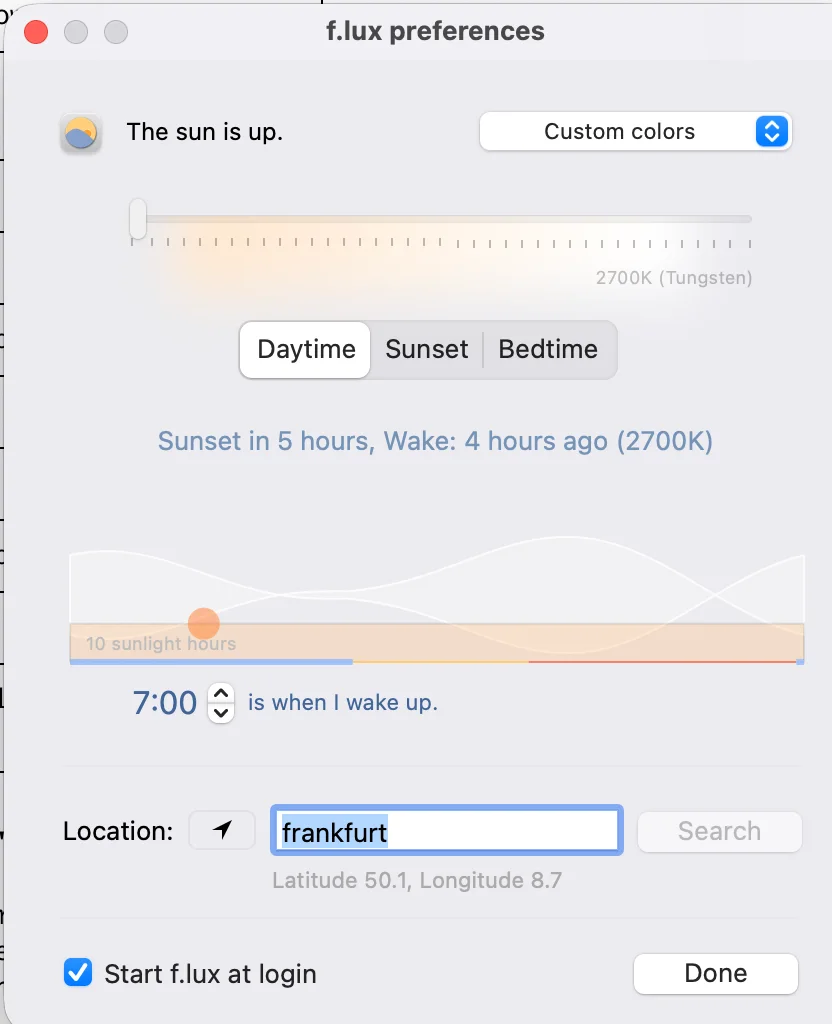
- Open f.lux preferences and drag the Daytime slider all the way to the left. In version 42.2 it reads 2700K (Tungsten).
- Look at a white window, for example an empty Finder window. If it stays white while f.lux says it is on, you are in the bug.
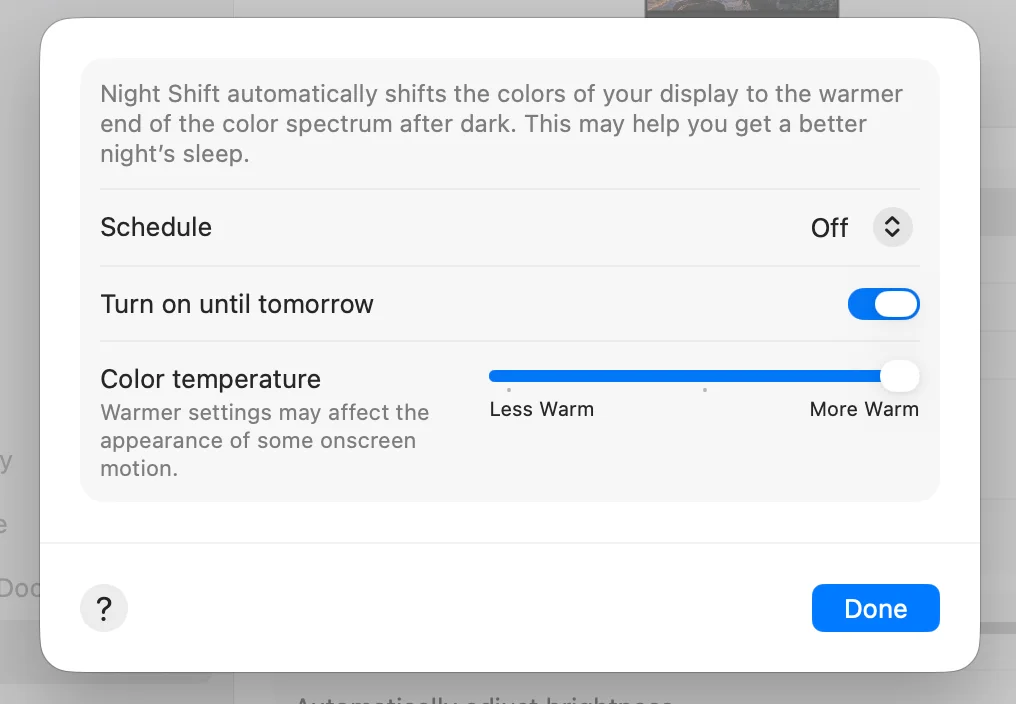
- Open System Settings, Displays, Night Shift. Turn on “Turn on until tomorrow” and move Color temperature to More Warm. The screen should turn mildly orange.
That is the whole test. Night Shift uses a different path and still moves the color. The gamma-table control does not. Do not use a screenshot to judge it: macOS composites captures separately, so a capture can look tinted while the panel in front of you is not.
Why does the app say it succeeded?
The call that sets a gamma table returns success. Reading the table back returns exactly the table that was just set. The display pipeline never applies it. So the app has no way to know; every value it can check agrees with it.
On our 14-inch M5 Pro on 26 October 2026, macOS 27.2 (build 26B123), we set a deep-red 256-entry table on the built-in display. The result code was 0. The readback matched at 0, 3 and 6 seconds. The panel did not change. The result was the same on macOS 27.0.1.
This is also why Atapa does not try to detect the bug from code. During setup it shows a method check and asks you to look at the screen, because the screen is the only honest readout.
What still works today?
Three things, in order of effort.
Night Shift. Built into macOS, nothing to install. On our M5 Pro at More Warm on 29 October 2026 it was mildly orange, never red. Apple does not publish a kelvin number; independent measurements put the warmest step around 2700 to 3000K.
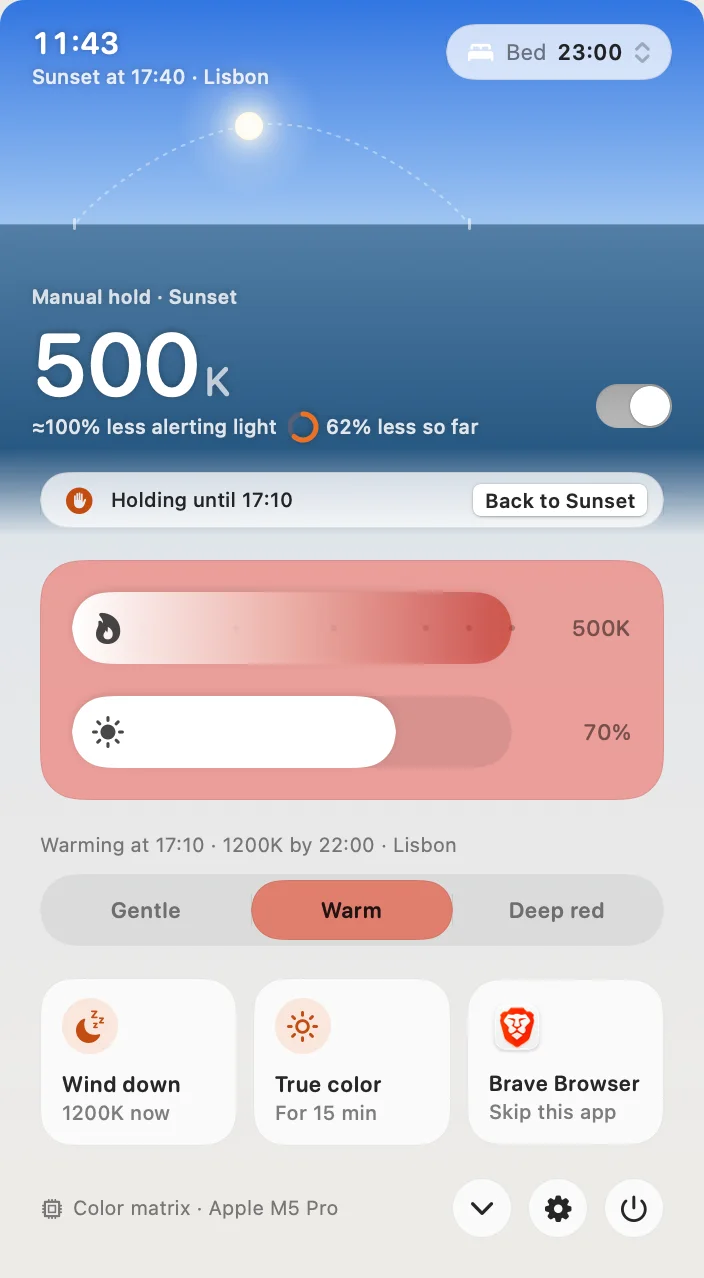
Atapa. Atapa is a Mac menu bar app that warms and dims the screen from daylight (6500K) to deep red (500K) through the evening. It works on M5 Pro and M5 Max MacBook Pros, where apps that tint through a gamma table do nothing. It costs $12 once for all of your own Macs, with a 14-day trial and a 14-day refund. It has no account and no network code. It requires macOS 14 or later on Apple silicon. Kevin Hofmann makes it at SOULRISE LLC. It tints in the display pipeline, not through the gamma table, so the bug does not touch it.
BetterDisplay’s non-gamma path. Its maintainer wrote on 13 October 2026 that image adjustments now go through a compositor filter instead of the color table. That is display configuration and brightness work, not an evening schedule, and it is the right tool for that job.
| App, as seen on the M5 Pro built-in display | Changes the panel? | Seen |
|---|---|---|
| f.lux 42.2 (the latest Mac build) | No. It says it is on; the panel does not change. Also named in Apple’s thread. | 2026-10-29, macOS 27.2 |
| Lunar and MonitorControl, color-table adjustments | No, named in Apple’s thread | Thread 819331 |
| Sundown 1.6.4 | Not available. Its own app: “Warming isn’t available on this Mac yet.” | 2026-10-29, macOS 27.2 |
| Night Shift | Yes. Mild orange at More Warm, never red. | 2026-10-29, macOS 27.2 |
| BetterDisplay | Image adjustments through a compositor filter since 2026-10-13, per its maintainer | Discussion 5217 |
| Atapa 1.0 | Yes, 6500K to 500K, readable deep red | 2026-10-29, macOS 27.2 |
Does Sundown work on this bug?
Sundown’s own app answers. On our 14-inch M5 Pro, macOS 27.2, on 29 October 2026, Sundown 1.6.4 showed this at the top of its window:
“Warming isn’t available on this Mac yet. Your Mac’s display ignores the usual way apps warm the screen, so for now Sundown leaves your screen’s color, brightness, Night Shift and True Tone as they are. We’re working on it.”
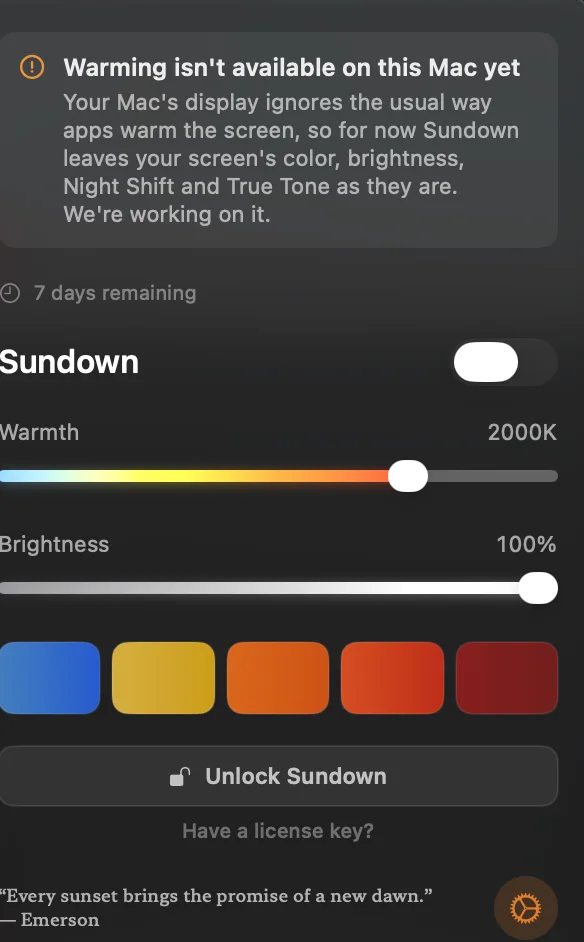
Sundown’s blog describes its flicker-free mode as dimming through the gamma table, which is the mechanism this bug ignores. They say they are working on it. We recheck after each Sundown update and date the line under What changed.
Credit where it is due: Sundown has a large guide library, a Windows build in progress, and far more customization than Atapa, including key pop-up styles, a Sound Studio, panel backgrounds, ambient-light dimming and room adaptation. If you are on an M1 to M4 Mac and want those, it is a fair choice. Its 7-day trial asked for a card at checkout on 2026-10-29 (“$39/year after your 7-day trial”); Atapa’s 14-day trial does not.
Will Apple fix it?
Apple’s Developer Technical Support reproduced the bug. It is filed as FB22273730, with duplicates FB22273782 and FB23444164. BetterDisplay’s maintainer wrote on 13 October 2026 that it was still with Apple engineering. It is open on macOS 27.0.1 and on 27.2.
We retest after each macOS update, with a 10-minute look at the panel, and add a dated line under What changed at the bottom of this page. When Apple fixes it, f.lux will work on these Macs again. Atapa does not depend on the fix either way.
Will the tint show in screenshots or on a call?
Not in screenshots. With the color matrix, a capture taken during the tint shows true color: tested on 2026-10-28 on the M5 Pro, macOS 27.2, with a capture before and during a visible orange tint. The tint is applied after the point where macOS captures the image.
Screen sharing uses the same capture path, so it should show true color to the other side as well. One FaceTime check is still open, and the result will be dated here. On older Macs where Atapa falls back to an overlay layer, captures do include the tint.
Transcript of the demo video
The video is still to be filmed. The words below are what it will say, and they match this page.
Read the transcript
Hi, I’m Kevin. I make Atapa. This is my 14-inch MacBook Pro with the M5 Pro chip, running macOS 27.2, and it is the 29th of October 2026. I’m pointing a phone at the panel, not taking screenshots, because on this Mac a screenshot does not show what the screen is doing.
First, f.lux. This is version 42.2, the latest Mac build. I open the preferences and drag the Daytime slider all the way to the left. It reads 2700K, Tungsten. f.lux says the sun is up and the setting is on. Look at the white window behind it. It is still white. Nothing happened. That is the bug. The app sets a gamma table, macOS says fine, and the display never applies it. Apple’s forum thread, number 819331, has it as bug FB22273730, and Apple reproduced it.
Second, Sundown. Version 1.6.4, the trial. I open it, and at the top of the window it says, I’m reading it: “Warming isn’t available on this Mac yet. Your Mac’s display ignores the usual way apps warm the screen, so for now Sundown leaves your screen’s color, brightness, Night Shift and True Tone as they are. We’re working on it.” So the app tells you itself. I’ll check again when they update.
Third, Night Shift. System Settings, Displays, Night Shift, turn on until tomorrow, slider to More Warm. Watch the panel. It goes mildly orange. So Night Shift still works, it uses a different path. It is just not very warm. Apple does not say how warm; people who have measured it say around 2700 to 3000K.
Now Atapa. I open the menu bar popover. It says Color matrix, Apple M5 Pro at the bottom. I drag the warmth slider down. 3400K, the screen is warm. 1900K, it is amber. 1200K, deep orange. 500K. Look at that. The screen is deep red, and you can still read the text, and the blue links are still there. That is Readable red: blue and green get folded into red instead of switched off.
I hold Option Command T and the screen goes back to true color while I hold it. Let go, it is red again. Control Option Command Delete resets everything. If the app ever crashes, a small guard process clears the tint.
That’s it. f.lux and Sundown did not change this panel today. Night Shift did, mildly. Atapa did, down to 500K. Links and dates are on the page.
Questions
Which Macs are affected by the gamma-table bug?
M5 Pro and M5 Max MacBook Pros, on the built-in display and on external displays, and the MacBook Neo on an external display, per Apple's thread 819331. Reports for the base M5 conflict and we have not tested one. On Intel and M1 to M4 Macs gamma tables still apply, so f.lux works there. Atapa runs on any Apple silicon Mac with macOS 14 or later; Intel Macs are not supported in 1.0.
How do I confirm the bug on my own Mac?
Open f.lux, drag the Daytime slider all the way left (2700K in version 42.2) and look at a white window. If the panel stays white while f.lux says it is on, you are in the bug. Then open System Settings, Displays, Night Shift, and move Color temperature to More Warm. Night Shift uses a different path and should still turn the screen mildly orange. One minute.
Why does f.lux say it is on when nothing changed?
The call that sets the gamma table returns success, and reading the table back returns the table that was just set. The display pipeline never applies it. The app cannot tell the difference, because every signal it can check agrees with it. On our M5 Pro on 2026-10-26 (macOS 27.2) a deep-red table returned code 0, read back correctly at 0, 3 and 6 seconds, and changed nothing.
What still works on an M5 Pro today?
Night Shift, which is built in and stops at a mild orange. Atapa, which tints in the display pipeline and goes to 500K. BetterDisplay's non-gamma image-adjustment path, which its maintainer added on 13 October 2026, for display configuration rather than an evening schedule. f.lux 42.2 and Sundown 1.6.4 did not change our panel on 2026-10-29.
Does Sundown work on M5 Pro?
On our 14-inch M5 Pro, macOS 27.2, on 2026-10-29, Sundown 1.6.4 showed its own message: "Warming isn't available on this Mac yet. Your Mac's display ignores the usual way apps warm the screen, so for now Sundown leaves your screen's color, brightness, Night Shift and True Tone as they are. We're working on it." We recheck after each Sundown update and date the result on this page.
Will Apple fix the M5 gamma bug?
Apple's Developer Technical Support reproduced it as FB22273730, with duplicates FB22273782 and FB23444164. BetterDisplay's maintainer wrote on 13 October 2026 that it was still with Apple engineering. It is open on macOS 27.0.1 and 27.2. We retest after each macOS update and add a dated line under What changed on this page.
Does Atapa's tint show in screenshots or on a video call?
Not in screenshots. With the color matrix, a capture taken during the tint shows true color, tested 2026-10-28 on the M5 Pro with macOS 27.2, because the tint is applied after the point where macOS captures the image. Screen sharing uses the same capture path, so it should show true color too; one FaceTime check is still open and will be dated here when done.
Sources
- Apple Developer Forums, thread 819331: CGSetDisplayTransferByTable is broken on macOS Tahoe with MacBook M5 Pro, Max and Neo (FB22273730) · read
- f.lux forum, topic 8640: macOS Tahoe 26 notes · read
- f.lux forum, topic 8639 · read
- BetterDisplay discussion 5217: M5 Pro and M5 Max color table issue, compositor-filter workaround (maintainer note of 2026-10-13) · read
- BetterDisplay discussion 5238: color table adjustments do not work on the M5 Pro built-in display · read
- monitor-lizard issue 30: M5 Pro, macOS 27.0.1, overlay as the replacement · read
- Apple Support: Use Night Shift on your Mac · read
- Sundown (trysundown.com), app version 1.6.4 trial on our M5 Pro · read
- f.lux (justgetflux.com), Mac version 42.2 · read
What changed
- First published. Eye-test on the M5 Pro (macOS 27.2): f.lux 42.2, Sundown 1.6.4, Night Shift at More Warm.