Screen-warmth apps for Mac: f.lux, Night Shift, Sundown, CircadianShield, Solace, Iris and Atapa, in one table
Screen-warmth apps for Mac differ on four things that change the purchase: whether the tint appears on an M5 Pro built-in display, how far toward red they go, whether blue links stay visible at that setting, and whether the app phones home. This table was checked on 2026-10-29. We make Atapa. Where another app is the better pick, the row says so.

Kevin Hofmann, maker of Atapa. Updated . We make Atapa. Corrections welcome at hello@atapa.app.
| Criterion | Atapa | f.lux | Night Shift | Sundown | CircadianShield | Solace | Iris |
|---|---|---|---|---|---|---|---|
| Works on M5 Pro/Max built-in display | Yes. 6500K to 500K on the built-in panel1 | No change on the built-in panel2f.lux 42.2 said it was on; the panel did not change. Also named in Apple thread 819331. | Works. Mild orange at More Warm, never red.2 | Not available. Its own app: "Warming isn't available on this Mac yet."3Sundown 1.6.4. They say they are working on it; re-check after each Sundown update. | "M5 has not been tested yet" (its own site); lists M1 through M4 Max4 | Not stated on its site5 | Not stated on its site6 |
| Warmest setting | 500K7 | 1900K daytime setting per its quick-start page; Ember preset about 1200K per competitor posts8re-check before launch | Apple doesn't publish it; independent measurements put the warmest setting around 2700–3000K9 | 500K claimed10 | 1800K4 | Not published5 | Not published as a kelvin figure6 |
| Readable red at 500K | Yes. Blue and green are folded into red7 | No8 | No red setting11 | Not described10 | Not described4 | Not described5 | Not described6 |
| Dims below the minimum | Yes7 | No8A brightness slider is a feature request on its forum. | No11 | Flicker-free mode dims through the gamma table, per its blog12macOS ignores gamma tables on M5 Pro and M5 Max. | Not described4 | Not described5 | Brightness control via software6re-check before launch |
| Shortcuts + Focus filter | Yes, plus a URL scheme and a CLI7 | No8 | Control Center toggle, schedule11 | Not listed10 | Not listed4 | Not listed5 | Not listed6 |
| Network use | None. No network code7 | Daily update check, per Sundown12re-check before launch | Part of macOS11 | "Zero telemetry" per its site10 | Anonymous usage statistics, off by default4 | Not stated5 | Licence activation online6re-check before launch |
| Windows | No7 | Yes8 | No11 | In progress, per its site10 | Yes, Windows 10 or later4 | No. macOS 13 or later5 | Yes6 |
| Price | $12 once, all your own Macs. 14-day trial, 14-day refund13 | Free (donation asked)8 | Built into macOS11 | $79 lifetime, $39 a year or $4.99 a month; 7-day trial that asks for a card10Prices on its own posts disagree; this is the checkout seen in 1.6.4 on 2026-10-29. | $47 once, up to 2 computers, no free trial, 30-day refund4 | $4.99 once5re-check before launch | ≈$2 a month or $10–15 licences6re-check before launch; the pricing page moved |
| Last update / checked | 1.0 in preparation14 | Mac 42.2 seen 2026-10-29; last Mac release date per Sundown 2023-05-1715re-check before launch | Ships with macOS11 | Version 1.6.4 seen 2026-10-2916 | Not dated on its site4re-check before launch | Not dated on its site5re-check before launch | No Mac update since 2022, per Sundown12re-check before launch |
- /m5/ ·
- docs/RESEARCH.md §1; own eye test on a 14-inch M5 Pro, macOS 27.2 ·
- docs/evidence/sundown-m5pro-2026-10-29.png ·
- circadianshield.com ·
- theodorehq.com/solace ·
- iristech.co ·
- /download/ ·
- justgetflux.com ·
- circadianshield.com/vs/night-shift ·
- trysundown.com ·
- support.apple.com/en-us/ht207513 ·
- trysundown.com/blog ·
- /buy/ ·
- /changelog/ ·
- trysundown.com/blog ·
- trysundown.com ·
Where each app leads
- f.lux Free, and it runs on Windows.
- Night Shift Zero install. Built in.
- Sundown A large guide library, a Windows build in progress, far more customization (key pop-up styles, Sound Studio, panel backgrounds), ambient-light dimming and room adaptation.
- CircadianShield Windows, and a melanopic dashboard.
- Solace Dark mode switching, wallpapers and warmth in one app.
- Iris Preset depth.
How we checked
We installed each app on a 14-inch MacBook Pro M5 Pro, macOS 27.2, on 2026-10-29, and looked at the built-in panel with our eyes, because captures cannot show the tint. The apps were f.lux 42.2 (the latest Mac build), Sundown 1.6.4 (the trial) and Night Shift at More Warm. Atapa was the 1.0 build of the same day.
Everything else in the table comes from each vendor’s own site, read on 2026-10-28 or 2026-10-29, with the URL in the cell. Where a vendor publishes no figure, the cell says so instead of guessing. Prices are the ones on the vendor’s page or in its checkout on that date; Sundown’s own posts list different prices, so we used its 1.6.4 checkout.
Who each app suits
| App | Pick it when | Skip it when |
|---|---|---|
| Night Shift | You want zero install and a mild warm tint is enough | You want red, or you read in a dark room |
| f.lux | You want a free app, you are on Windows, or on an Intel or M1 to M4 Mac | You are on an M5 Pro or M5 Max: on our panel it changed nothing on 2026-10-29 |
| Sundown | You want its guide library, its customization, or a Windows build later, on an M1 to M4 Mac | You are on an M5 Pro or M5 Max: its own app said warming is not available yet on 2026-10-29 |
| CircadianShield | You want a Windows and Mac licence and a melanopic dashboard | You are on an M5 (its site says not tested) or you want a free trial |
| Solace | You mostly want dark mode and wallpaper switching, with warmth as one feature | You want deep red or a published kelvin figure |
| Iris | You want many presets and a Windows build | You want a dated Mac release or offline licensing |
| Atapa | You are on an M5 Pro or M5 Max, or you want readable deep red at 500K, paid once, with no network code | You are on an Intel Mac (not supported in 1.0) or you want Windows |
Choose f.lux if
You want a free app and you are on Windows, or on a Mac where gamma tables still apply: Intel, and M1 through M4. f.lux has a sunset schedule and color effects down to Ember (about 1200K, per competitor posts). Its Mac build has had a long quiet period (Sundown gives 17 May 2023 as the last release; we saw version 42.2 on 2026-10-29), and it is named in Apple’s thread 819331 as one of the apps the M5 gamma bug breaks. On our M5 Pro on 2026-10-29 it said it was on and the panel did not change. Details on the M5 page.
Choose Night Shift if
A mild warm tint is enough for you. It is built in, it needs no install, and it still changes the screen on M5 Macs: on our M5 Pro at More Warm on 2026-10-29 it was mildly orange. It never goes red. Apple publishes no kelvin value; independent measurements put the warmest setting around 2700 to 3000K. It has a schedule and a Control Center toggle, and nothing to pay.
Choose Sundown if
You want a large library of guides, a Windows build (in progress, per its site), and a lot of customization: key pop-up styles, a Sound Studio, panel backgrounds, ambient-light dimming and room adaptation. Those are real advantages. Its site says zero telemetry. The published prices are $79 lifetime, $39 a year or $4.99 a month, and the 7-day trial asked for a card at checkout on 2026-10-29.
On an M5 Pro or M5 Max, read its own notice first. On our 14-inch M5 Pro, macOS 27.2, on 2026-10-29, Sundown 1.6.4 said: “Warming isn’t available on this Mac yet.” They say they are working on it, and we recheck after each update. Its blog describes its flicker-free mode as dimming through the gamma table, which is the path macOS ignores on those chips.
Choose CircadianShield if
You want one licence for Mac and Windows, and a dashboard that reports melanopic light. It is $47 once for up to 2 computers, with a 30-day refund and no free trial. Its warmest published setting is 1800K. Its own site lists Apple silicon M1 through M4 Max and says M5 has not been tested yet (read 2026-10-28). It sends anonymous usage statistics, off by default.
Choose Solace if
You mostly want dark mode switching and wallpapers, with screen warmth in the same app, for $4.99 once (read 2026-10-28). It requires macOS 13 or later. It publishes no kelvin figure and does not state M5 support, so on an M5 Pro you would be testing it yourself.
Choose Iris if
You want preset depth and a Windows build. It is an older Mac app; Sundown’s posts say no Mac update since 2022, and its pricing page had moved when we checked on 2026-10-28 (about $2 a month or $10 to $15 licences, to be re-checked). Licence activation is online. It does not state M5 support.
Choose Atapa if
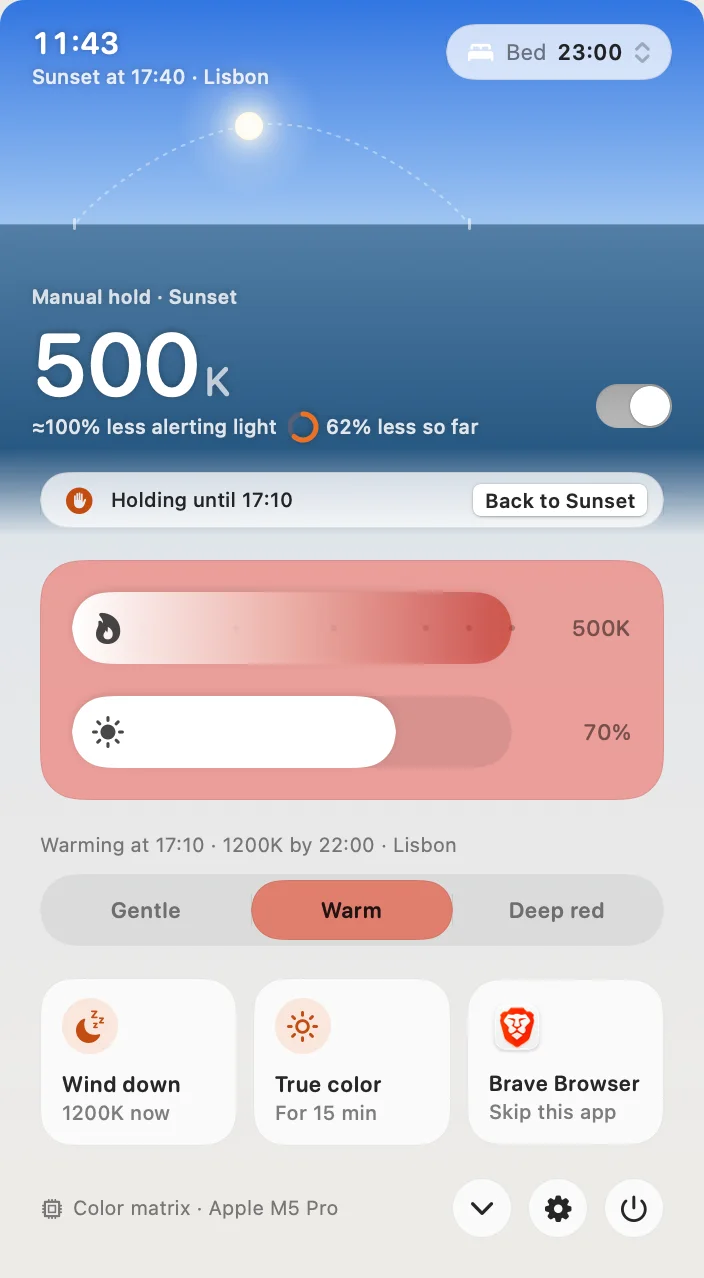
You are on an M5 Pro or M5 Max and you want the screen to actually change, or you want deep red that stays readable on any Apple silicon Mac. At 500K, Atapa folds blue and green into red so links and syntax colors remain visible; a plain red filter turns them black. It dims below the lowest brightness step, has Shortcuts actions, a Focus filter, a URL scheme and a CLI, and contains no network code. $12 once for all of your own Macs, 14-day trial without a card, 14-day refund. Intel Macs are not supported in 1.0.
What the table does not say
Gloam and Abendrot are free, open-source Mac warmth apps with little published testing on M5, so they are not in the table. Lunar, BetterDisplay and MonitorControl are brightness and display-configuration tools, not evening-warmth apps; they are named in Apple’s thread because color-table adjustments no longer apply, and BetterDisplay’s maintainer moved image adjustments to a compositor filter on 2026-10-13.
The table is not a sleep claim. None of these apps, Atapa included, has been shown to improve sleep. What a screen can and cannot do is on the science page.
Questions
Which Mac warmth apps change the screen on an M5 Pro?
On our 14-inch M5 Pro with macOS 27.2 on 2026-10-29: Night Shift changed the screen (mildly orange at More Warm) and Atapa changed it (down to 500K). f.lux 42.2 said it was on and the panel did not change. Sundown 1.6.4 showed its own notice that warming is not available on this Mac yet. CircadianShield's site says M5 has not been tested. Solace and Iris do not state it.
Which is the warmest setting each app offers?
Atapa and Sundown both go to 500K; Sundown's figure is its own claim, and on our M5 Pro its warming was not available. CircadianShield publishes 1800K. f.lux's quick-start page lists 1900K for daytime, and its Ember effect is about 1200K per competitor posts. Apple publishes no number for Night Shift; independent measurements put More Warm around 2700 to 3000K. Solace and Iris publish no kelvin figure.
Which apps keep text and links readable at deep red?
At a plain red setting, blue and green are switched off, so blue links and icons go black. Atapa's Readable red folds blue and green into red below 1500K so they stay visible at 500K. We found no other app on this list that describes a comparable mode as of 2026-10-29. Night Shift has no red setting at all.
Which apps use the network?
Atapa has no network code at all: no account, no update check, no analytics; the licence key is checked on the Mac. Sundown says zero telemetry on its site. CircadianShield sends anonymous usage statistics, off by default. f.lux does a daily update check, per Sundown's blog. Iris activates its licence online. Solace does not state it. All checked 2026-10-28 and 2026-10-29.
What does each app cost?
f.lux and Night Shift are free. Solace is $4.99 once. Atapa is $12 once for all of your own Macs, with a 14-day trial and a 14-day refund. CircadianShield is $47 once for up to 2 computers with no free trial and a 30-day refund. Sundown is $79 lifetime, $39 a year or $4.99 a month with a 7-day trial that asks for a card. Iris is about $2 a month or $10 to $15 licences; its pricing page moved. Prices read 2026-10-28 and 2026-10-29.
Why is Atapa first only in some columns?
Because that is where it leads: the M5 Pro built-in display, readable deep red, dimming below the lowest brightness step, and no network code. f.lux is free and runs on Windows. Night Shift needs no install. Sundown has a far larger guide library and more customization. CircadianShield runs on Windows and has a melanopic dashboard. Solace bundles dark mode and wallpapers. Iris has deeper presets.
Sources
- f.lux (justgetflux.com), Mac version 42.2 seen on our M5 Pro · read
- f.lux forum, topic 8639 · read
- Apple Support: Use Night Shift on your Mac · read
- Sundown (trysundown.com) · read
- Sundown blog (comparison posts, flicker-free mode description) · read
- CircadianShield (circadianshield.com) · read
- Solace by Theodore HQ · read
- Iris (iristech.co) · read
- Apple Developer Forums, thread 819331 (FB22273730) · read
- Gloam on GitHub (free, open source) · read
What changed
- First published. Eye-test on the M5 Pro (macOS 27.2): f.lux 42.2, Sundown 1.6.4, Night Shift at More Warm.