Atapa vs f.lux: which one changes the screen on your Mac?
Choose f.lux if you want a free warmth app on Windows or on a Mac where gamma tables still apply. Choose Atapa if you are on an M5 Pro or M5 Max, or if you want deep red at 500K with links still readable, paid once, with no network code. f.lux is named in Apple's thread as one of the apps the M5 gamma bug breaks.

Kevin Hofmann, maker of Atapa. Updated . We make Atapa. Corrections welcome at hello@atapa.app.
f.lux is the app most people reach for first, for good reasons. This page is about where the two differ, with the date on each fact.
Side by side
| Criterion | f.lux | Atapa |
|---|---|---|
| Price | Free, donation asked (2026-10-28) | $12 once, all of your own Macs; 14-day trial, 14-day refund |
| Platforms | macOS and Windows | macOS 14 or later, Apple silicon. Intel not supported in 1.0 |
| M5 Pro built-in display | No change. f.lux 42.2 said it was on; the panel did not change (2026-10-29, macOS 27.2). Named in Apple thread 819331 | Changes the screen, 6500K to 500K (2026-10-29, macOS 27.2) |
| Warmest | 1900K daytime per its quick-start page; Ember about 1200K per competitor posts (2026-10-28) | 500K |
| Readable red | No | Yes: blue and green folded into red below 1500K |
| Dims below the lowest brightness step | No; a brightness slider is a feature request on its forum (2026-10-28) | Yes, to a 5% floor you can raise |
| Shortcuts and Focus filter | No (2026-10-28) | Nine Shortcuts actions, a Focus filter, a URL scheme, a CLI |
| Network use | Daily update check, per Sundown’s blog (2026-10-28) | None |
| Last Mac release | Version 42.2 seen 2026-10-29; last release 2023-05-17 per Sundown | 1.0, 2026-10-29 |
Where f.lux leads
It is free. It runs on Windows, so one habit covers both machines. It has a sunset schedule, a wake-up time, and color effects. On an Intel Mac or an M1 through M4 Mac it still does its job, and if that is your Mac there is no M5 reason to switch.
Where it stops on an M5 Pro
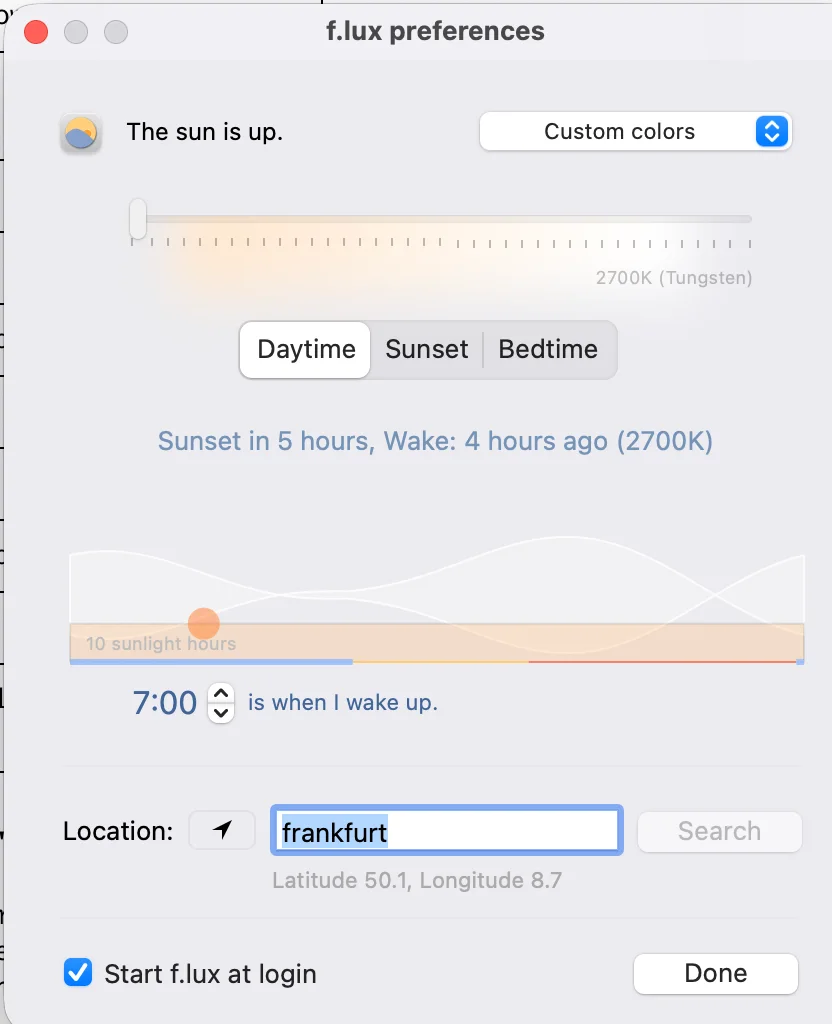
Since the M5 Pro and M5 Max, macOS accepts the gamma table that f.lux sets and never shows it (Apple bug FB22273730, open on macOS 27.2 as of 26 October 2026). The app cannot see the failure, because reading the table back returns what it set. On our 14-inch M5 Pro on 29 October 2026, f.lux 42.2 with the Daytime slider at its lowest stop, 2700K (Tungsten), said “The sun is up” and the panel stayed white. The f.lux developer is tracking the bug in the f.lux forum and waiting on Apple.
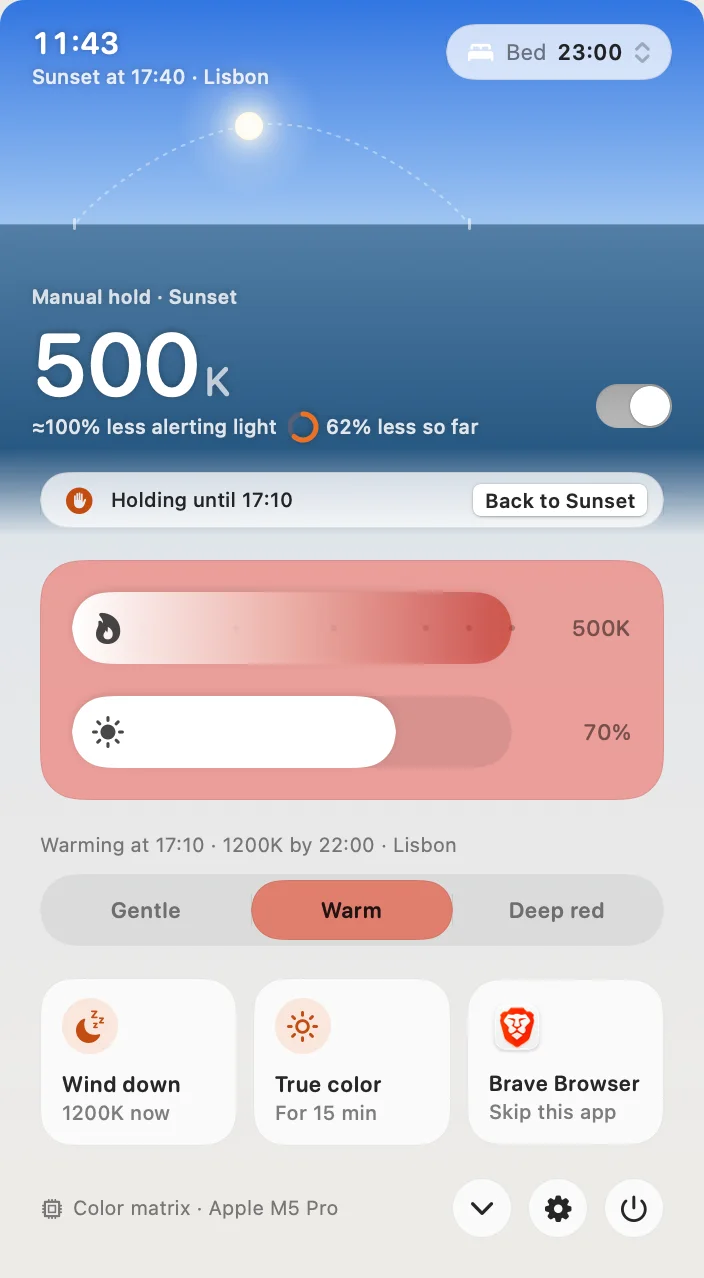
Atapa tints in the display pipeline instead of through the gamma table, so the same Mac goes from 6500K to 500K. The full test, with the one-minute check you can run yourself, is on the M5 page.
Deep red that stays readable
f.lux’s warmest settings are orange. Atapa goes on to 500K, and from 1500K down it folds blue and green into red instead of switching them off. A pure blue link that a plain red filter would turn black stays visible as a darker red. That matters for night reading, astronomy and any dark room. The method, with simulated frames and the numbers, is on the Readable red page.
Dimming, Shortcuts and privacy
Atapa dims below the lowest brightness step of the hardware, down to a floor of 5% that you can raise in Settings, Comfort. The brightness keys can drive that dimming once you grant Accessibility. f.lux has no brightness control; a slider is a long-standing request on its forum.
Atapa ships nine Shortcuts actions (Wind Down, Show True Color, Set Warmth and the rest), a Focus filter so a Sleep Focus can mean deep red, a URL scheme and a CLI. f.lux has none of these on macOS as of 2026-10-28.
Atapa contains no network code: no account, no update check, no analytics, and the licence is an offline signed key. f.lux checks for updates daily, per Sundown’s blog; we have not measured it.
Price
f.lux is free. Atapa is $12 once for all of your own Macs, with a 14-day trial that asks for no card and a 14-day refund. After the trial it never stops working: from day 29 without a key, warmth stops at 2700K and everything else continues. Deep red needs a key.
Choose f.lux if
You want a free app, you are on Windows, or you are on an Intel or M1 to M4 Mac and orange at sunset is what you want. It is a good app on those machines, and nothing on this page argues with that.
Choose Atapa if
You are on an M5 Pro or M5 Max and the screen has to change. Or you want deep red at 500K with links still readable, dimming below the hardware minimum, Shortcuts and a Focus filter, and an app that never touches the network. Try it free for 14 days; the trial does not ask for a card.
Questions
Is f.lux broken on M5 Pro and M5 Max?
f.lux is named in Apple's developer thread 819331 as one of the apps affected by bug FB22273730: macOS accepts a gamma table and never applies it on those chips. On our 14-inch M5 Pro, macOS 27.2, on 2026-10-29, f.lux 42.2 said it was on and the panel did not change. The f.lux developer is tracking the bug and waiting on Apple. On Intel and M1 to M4 Macs it works as before.
Is f.lux free and is Atapa free?
f.lux is free and asks for a donation. Atapa is $12 once for all of your own Macs, with a 14-day trial that does not ask for a card and a 14-day refund. After the trial Atapa keeps working: days 15 to 28 show a banner, and from day 29 without a key warmth stops at 2700K while dimming, the evening curve and Shortcuts keep working. Deep red needs a key.
Does f.lux run on Windows? Does Atapa?
f.lux runs on Windows and macOS. Atapa is Mac only, on Apple silicon with macOS 14 or later; Intel Macs are not supported in 1.0. If you need one app on both systems, f.lux is the pick, or CircadianShield if you want a paid app with a Windows build.
How warm does each one go?
f.lux's quick-start page lists 1900K for daytime settings, and its Ember color effect is about 1200K per competitor posts. On our M5 Pro the Daytime slider read 2700K at its lowest stop in version 42.2. Atapa goes to 500K, and below 1500K it folds blue and green into red so links and icons stay visible. Both have a sunset schedule.
Does either app use the network?
Per Sundown's blog, f.lux does a daily update check; we have not measured it ourselves. Atapa has no network code at all: no account, no update ping, no analytics, and the licence key is checked on the Mac with an offline signature. The website uses Cloudflare Web Analytics; the app does not.